> ## Documentation Index
> Fetch the complete documentation index at: https://docs.askfutures.com/llms.txt
> Use this file to discover all available pages before exploring further.
# Version and compare
> Every edit creates a version. Step through them on the strategy card, compare their backtest results, and revert by continuing from an older one.
Every time you edit a strategy, AskFutures saves a **new version** — the old one
stays exactly as it was, backtest and all. So you can step back through your
history, line up the numbers, and pick the version you actually want. Nothing you
tried is ever lost.
Editing is non-destructive. *"Add a 1.5× ATR stop,"* *"make it longs only,"*
*"switch to 5-minute bars"* — each becomes a fresh version built from the
current one, not an overwrite. See
[sessions, versions and artifacts](/concepts/sessions-versions-artifacts).
## How a version chain builds up
Each strategy is a chain of versions, newest at the tip. When you ask for a
change, AskFutures branches a new version off the latest one.
```mermaid theme={null}
flowchart LR
V1["v1
base idea"] --> V2["v2
added ATR stop"]
V2 --> V3["v3
longs only"]
V3 --> V4["v4
5-min bars"]
```
## Step through versions
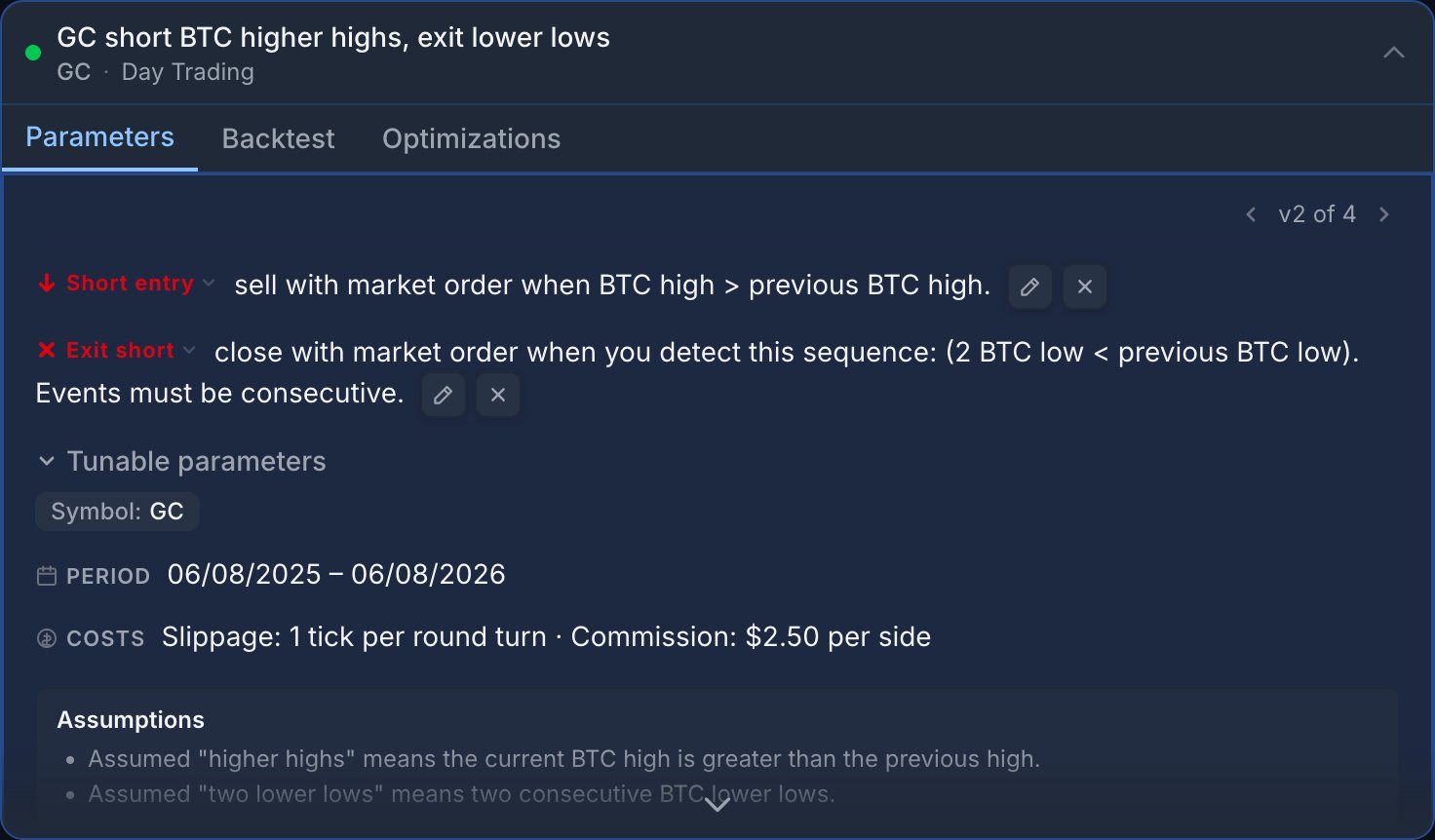
The strategy card shows which version you're viewing and lets you move through the
chain. Step back to any earlier version to see its exact rules and its own backtest
results — nothing recomputes, because each version keeps the numbers it ran with.
 Not sure what changed between two versions? Ask in chat — *"what's different
between v2 and v3?"* — and AskFutures will spell out the edit.
## Compare metrics across versions
Because a backtest is pinned to the **exact version** it ran on, comparing is
apples to apples — you never see numbers from one set of rules sitting next to a
different set by accident.
Every version carries its own results. If an older version was never
backtested over the window you care about, re-run it so both share the same
period.
Put the versions side by side and read across — total P\&L, average P\&L per
trade, win rate, max drawdown, number of trades. Ask AskFutures to summarise
the comparison if you'd rather read it in plain English.
A higher total P\&L from far fewer trades is a different bet than a steadier
edge across many. Look at drawdown and trade count, not only the top-line
number.
Backtest results are **hypothetical and simulated**, net of modeled slippage and
commission. A version that looks better on past data may not be better next.
Past performance does not guarantee future results. Always test before you trade.
## Compare apples to apples
The engine is [deterministic](/concepts/is-the-backtest-real), so the same
version over the same data always reproduces the same numbers. One caveat: the
market data refreshes daily, so re-running a relative period like *"last 1
year"* can include newer bars. To compare two versions cleanly, run both over
the **same explicit date window**.
## Revert by continuing from an older version
There's no destructive "undo" — and you don't need one. To go back, just **step
to the version you liked and continue from there.** Your next edit branches a new
version off that older one; the versions you're leaving behind stay untouched, so
nothing is lost either way.
Step back to the version before the edit and keep working from it. The new
version you create branches off the good one; the worse version stays in the
chain but out of your way.
No. Continuing from an older version is non-destructive — every version stays
exactly as it was, including its backtest results. You can always step forward
again.
No. Here, *version* always means a saved snapshot of **your** strategy in its
edit chain (v1 → v2 → v3). It has nothing to do with the product release or
any internal engine version.
## Next steps
Not sure what changed between two versions? Ask in chat — *"what's different
between v2 and v3?"* — and AskFutures will spell out the edit.
## Compare metrics across versions
Because a backtest is pinned to the **exact version** it ran on, comparing is
apples to apples — you never see numbers from one set of rules sitting next to a
different set by accident.
Every version carries its own results. If an older version was never
backtested over the window you care about, re-run it so both share the same
period.
Put the versions side by side and read across — total P\&L, average P\&L per
trade, win rate, max drawdown, number of trades. Ask AskFutures to summarise
the comparison if you'd rather read it in plain English.
A higher total P\&L from far fewer trades is a different bet than a steadier
edge across many. Look at drawdown and trade count, not only the top-line
number.
Backtest results are **hypothetical and simulated**, net of modeled slippage and
commission. A version that looks better on past data may not be better next.
Past performance does not guarantee future results. Always test before you trade.
## Compare apples to apples
The engine is [deterministic](/concepts/is-the-backtest-real), so the same
version over the same data always reproduces the same numbers. One caveat: the
market data refreshes daily, so re-running a relative period like *"last 1
year"* can include newer bars. To compare two versions cleanly, run both over
the **same explicit date window**.
## Revert by continuing from an older version
There's no destructive "undo" — and you don't need one. To go back, just **step
to the version you liked and continue from there.** Your next edit branches a new
version off that older one; the versions you're leaving behind stay untouched, so
nothing is lost either way.
Step back to the version before the edit and keep working from it. The new
version you create branches off the good one; the worse version stays in the
chain but out of your way.
No. Continuing from an older version is non-destructive — every version stays
exactly as it was, including its backtest results. You can always step forward
again.
No. Here, *version* always means a saved snapshot of **your** strategy in its
edit chain (v1 → v2 → v3). It has nothing to do with the product release or
any internal engine version.
## Next steps