

Every run in a sweep is a normal, deterministic backtest — same real prices,
same modeled costs. Optimization just runs many of them and compares the
numbers. The AI doesn’t decide what’s “best”; the simulator does the math and
the metric does the ranking. See optimization.
Before you sweep
Optimize a strategy that already backtests cleanly and shows a plausible edge — to refine it, not to rescue it. If the strategy fails to run, takes a handful of trades, or loses across the board, no range of stop sizes will fix it. Fix the logic in chat first (see iterate and refine), then sweep.Run a sweep by chatting
1
Say what to sweep and over what range
Name a tunable number on the strategy card and give it a range. Plain English
is enough:
- “Optimize the stop between 10 and 50 points.”
- “Sweep the EMA period from 10 to 50, step 5.”
- “Try targets from 600 in $100 steps.”
2
Pick the metric to optimize
Tell it what “better” means for this idea — “rank by average P&L per trade,”
“best total P&L,” or “best win rate.” If you don’t say, AskFutures will
confirm the metric before it runs.
3
Check the size of the job, then run it
The strategy card shows the job before you commit — something like
“1 parameter · 9 runs.” Two ranges multiply: a 5-value stop sweep crossed
with a 4-value target sweep is 20 runs. When it looks right, let it run.
4
Read the results and select the winner
AskFutures backtests every combination, ranks them by your metric, and reports
the winning parameter set. Like the look of one? Click Select on that row
(or just ask) — the chosen values become a new saved
version of the strategy.
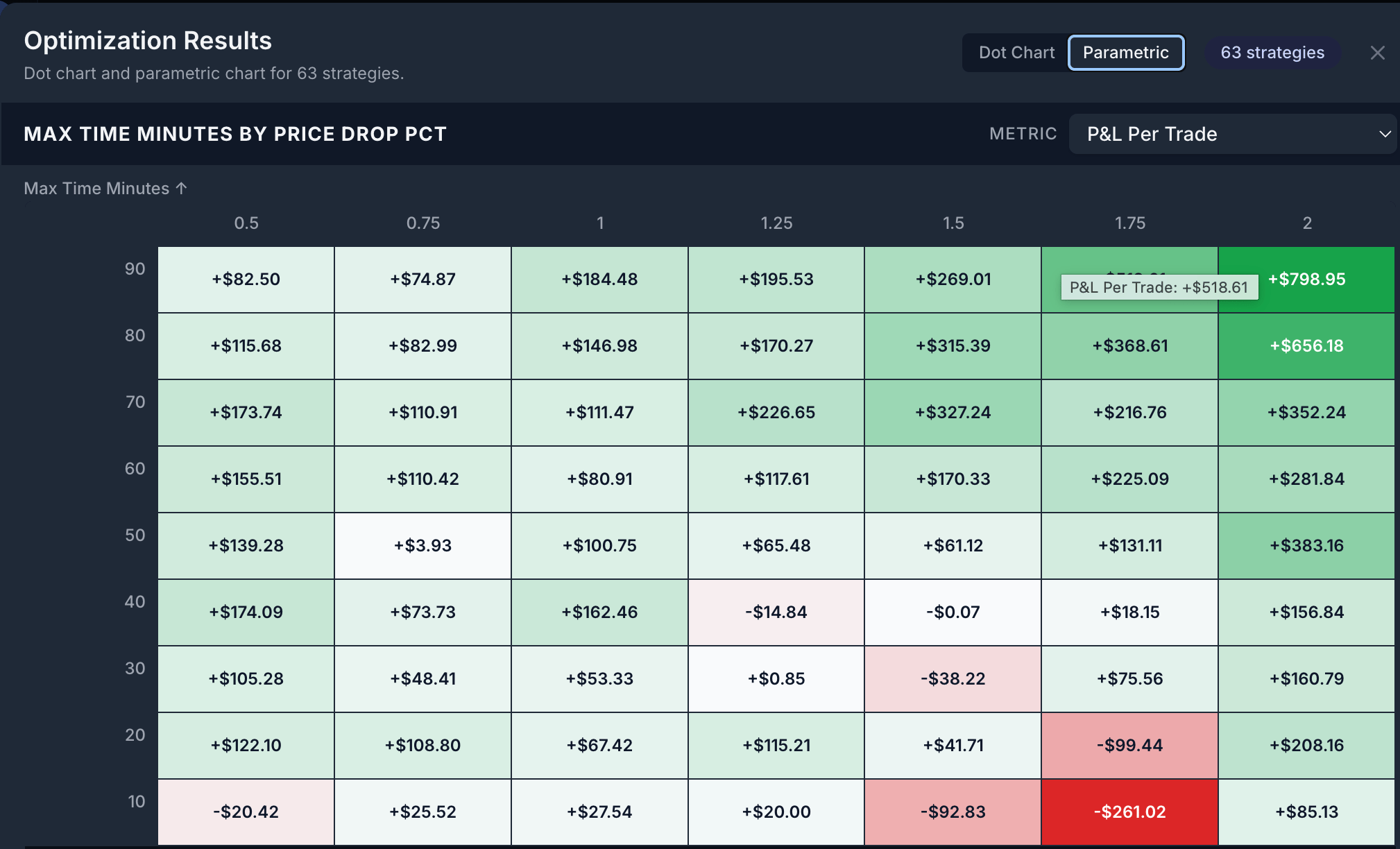
Optimization results in the Parametric view — every parameter combination as a heatmap, shaded by your chosen metric (here, P&L per trade). Toggle to the Dot Chart to compare strategies as individual points.
Sweep one parameter or two
- One parameter
- Two parameters
“Sweep the stop from 10 to 50 points in steps of 5.”AskFutures runs nine backtests — one per stop value — and ranks them. This is
the fastest, clearest way to ask “what’s the best value for this one knob?”
Reading the scatter and the ranking
Each sweep finishes as a labelled batch — for example “Optimization 1 · Completed · 9 combinations · Best: $-2.97 avg” — naming the winning parameters and their score on your chosen metric.The scatter chart
Each dot is one combination: the parameter value (or pair of values) against
its score. Look for a broad cluster of strong results, not a single dot
floating above the rest.
The ranked table
Every combination, sorted by your metric, with the parameter values and the
score for each. The top row is the winner; download the full table as a CSV to
compare every run yourself.
Read the scatter for shape, not just the peak. A wide plateau of decent
results is far more trustworthy than one tall spike surrounded by losers.